Romeo Tango Software, Inc
Romeo Tango Software, Inc
 |
Screen Saver Installation HelpAfter downloading the screen saver, move the file into either the C:\Windows directory or the C:\Windows\System directory. (Either directory may be used. If you are a stickler for neatness, you may wish to place the file with any other screen savers on your system. You can use Windows Explorer or Find Files to locate any other *.scr files.) (Under Windows NT, screen savers are in C:\WinNT directory and the C:\WinNT\System32 directories.) Click the Windows Start button and scroll up the Start Menu to Settings. Move across to Control Panel and click.
The Control Panel window should open. Double click the Display icon.
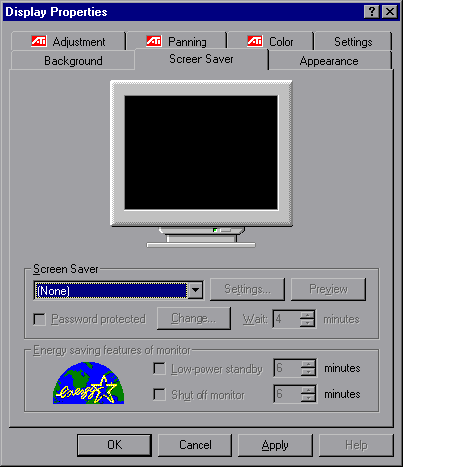
The Display Properties panel should open. At the top, click on the Screen Saver tab.
The panel should look something like:
Two-thirds of the way down the panel, next to the blue (none), click on the down arrow. A list of available screen savers will be displayed. Scroll until you find the one that you want and click on it. Its name will replace the (none) and you should see it running in the mini-display at the top of the panel. Press the Preview button to see it run on the full screen. As always, any mouse movement or keyboard input will end the screen saver and bring you back to your current desktop. Some screen savers have setting which vary how the screen saver runs. For instance, the Sun Flowers screen saver allows you set set the number and size of the sun flowers. This box will be grayed out if the screen saver does not have a settings dialog. Press the OK button to keep the selected screen saver settings and exit the Display Properties panel. Press the Cancel button to exit without changing the screen saver settings. Press the Apply button to keep the selected screen saver settings but keep the Display Properties panel active. |
Romeo Tango Software, Inc.
Installing and/or using this software implies that you acknowledge that you have read the End User License Agreement, understand it, and agree to be bound by its terms and conditions.
Last Updated August 8, 2005